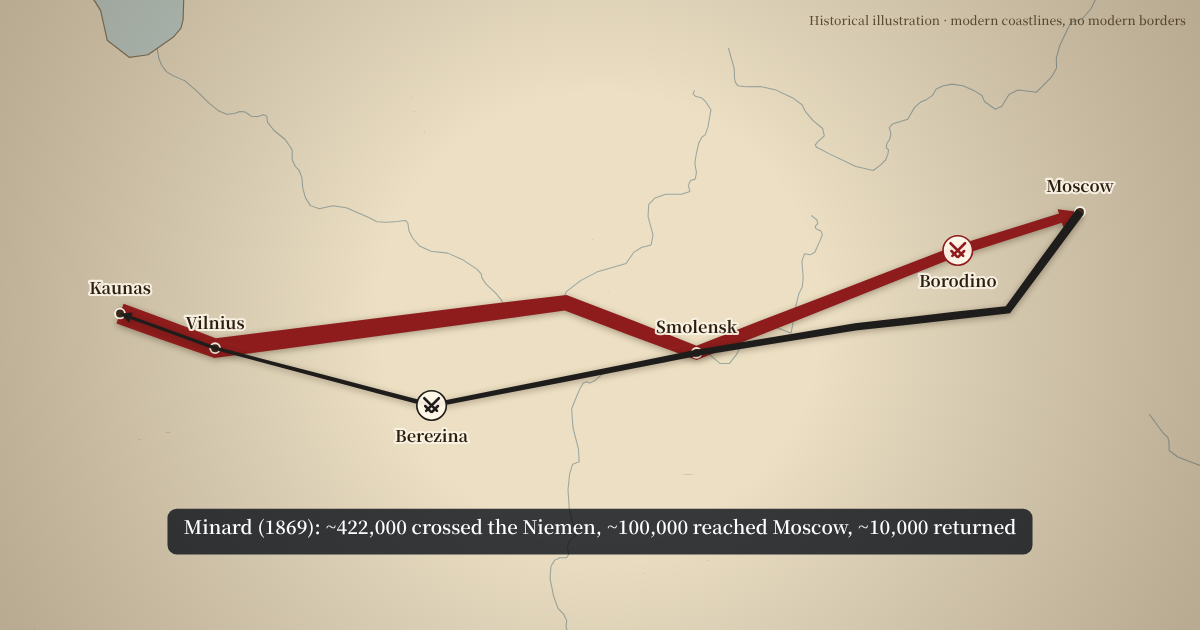
The 1812 campaign in this battle map animation
- 24 June 1812: the Grande Armée crosses the Niemen into Russia.
- 16–18 August: the battle of Smolensk.
- 7 September: the battle of Borodino, west of Moscow.
- 14 September: the army enters Moscow, which is soon on fire.
- 19 October: the retreat begins.
- 26–29 November: the crossing of the Berezina.
The advance is one arrow and the retreat another, so each gets its own colour, width and time in the segment bar.
Show losses with arrow width, as Minard did
Charles Joseph Minard's 1869 chart of the same campaign drew Napoleon's army as a band that narrows as men are lost. The arrows here work the same way: set a start width and an end width, and the arrow tapers as it advances. The closing caption gives Minard's figures: about 422,000 crossed the Niemen, about 100,000 reached Moscow and about 10,000 came back.
The idea works for any campaign where numbers change: a siege that wears an army down, a relief force that grows as it marches, or two sides of very different size.
Make your own battle map animation
- Open the Campaign arrows tab (it is already open above).
- Replace the places with your own: search any city, or keep the ones you need.
- Tick “Battle marker” where fighting happened and write the date caption.
- Add a second arrow for the other side or the retreat, in its own colour.
- Write the closing caption: the outcome, a casualty figure or the date the campaign ended.
- Time it to your narration, then export.
Campaigns that work well as a battle map animation
The map is drawn at the scale of countries and regions, so it suits campaigns that cover hundreds of kilometres. A few that history channels return to often:
- Hannibal, 218–216 BC: from Spain over the Alps into Italy, with markers at the Trebia, Lake Trasimene and Cannae.
- Napoleon, 1805: from the Rhine down the Danube to Austerlitz.
- Sherman's March to the Sea, 1864: Atlanta to Savannah, one arrow through Georgia.
- The Schlieffen Plan, 1914: a wide arrow through Belgium towards Paris, halted at the Marne.
- Operation Barbarossa, 1941: three army groups at once; there is a ready-made WW2 example.
Look up the dates and places in a source you trust before you build the arrows; the map shows what you type.
Timing battle arrows to narration
Battles are usually narrated slowly, with pauses for context. Load your voice-over and press Space at the start of each sentence; the arrow moves to the place that sentence is about, arrives a moment before your next press, and its date stays on screen into the next sentence. If one line moves in a later edit, drag that one cut and every other cut stays where it was. The exported length is exact to the frame, so the clip lines up with your audio without trimming.
Accuracy checklist before you publish
- Are the dates in the captions the ones your script uses?
- Do the arrows pass the right side of rivers and mountains your story depends on?
- Are both sides drawn at the same width scale?
- Does the corner note say that modern borders are hidden, or that the line is simplified?
From script to animated battle map
Write one sentence per place in your script: “On 24 June the Grande Armée crossed the Niemen”, “At Smolensk it met the Russian army”, “By mid-September it was in Moscow”. Record it, load the recording and tap Space at the start of each sentence. The arrow moves to each place while its sentence is spoken and arrives a moment before the next one begins.
Markers, labels and captions on a battle map
Every point on an arrow has three switches. Label shows the place name when the arrow arrives; untick it for points that only shape the line. Battle marker adds crossed swords at the place. The date caption appears at the bottom of the frame as the arrow reaches the point and stays until the next one replaces it.
A closing caption sums up the outcome after the last arrow, and a small corner note can say what the map does not show, for example that borders are modern or that a route is simplified. Together they let the map carry the key facts on screen even with the sound off, which matters on social platforms where many people watch muted.
Styles for a battle map animation
The vintage paper style is the default for historical examples: cream land, grey-green water and, in the examples, a serif font that suits older campaigns. The dark news style gives a modern documentary look with bright arrows, and the light style is the clearest for classrooms and slides. Pick the colour of each arrow yourself; a warm colour for the attacker and a cold one for the defender is a common choice that viewers read without a legend.
Save the combination as a channel style. The next campaign then starts with your colours and font, and a series of episodes looks like one production.
Free battle map animation export
Exports are free at 720p and 1080p, 30 fps, as an MP4 with a small watermark in a corner. They open in Premiere Pro, DaVinci Resolve, Final Cut and CapCut. A paid plan without the watermark and with 4K and 60 fps is planned for channels that publish often.
Battle map animation FAQ
Are the dates in the example correct?
They follow standard accounts: Niemen crossing 24 June 1812, Battle of Borodino 7 September, Moscow entered 14 September and left 19 October, Berezina crossing 26–29 November. The figures are Minard's.
Can I show two armies converging?
Yes. Add an arrow for each side; they draw one after the other. Put a battle marker where they meet.
Why are there no borders?
Modern borders would be wrong for 1812, so the example hides them. You can turn borders on in the Style tab.
Can I zoom in to a single battlefield?
The map is detailed enough for regions and countries. A single battlefield of a few kilometres would look empty at this level of detail.
Can I use a modern map style for a battle map?
Yes. Switch to the light or dark style in the Style tab; the vintage style is only the default for historical examples.
Does the exported video have sound effects?
No. The MP4 is silent so it sits cleanly under your voice-over and music in your editor.
How long should a battle map animation be?
Long enough for the narration it sits under. Each stop gets one and a half to three seconds by default; most campaign shots in history videos run 15 to 30 seconds.