What this war map maker draws
- Campaign arrows with a start and an end width, so strength or losses are visible at a glance.
- Several arrows in sequence: an advance and a retreat, two sides converging, or three army groups, each in its own colour and with its own name.
- Battle markers (crossed swords) that appear when the arrow reaches the place.
- Date captions that follow the arrow, e.g. “331 BC · Battle of Gaugamela”.
- A closing caption for the outcome, and a small corner note to say what the map does and does not show.
The example: Alexander the Great, 334–323 BC
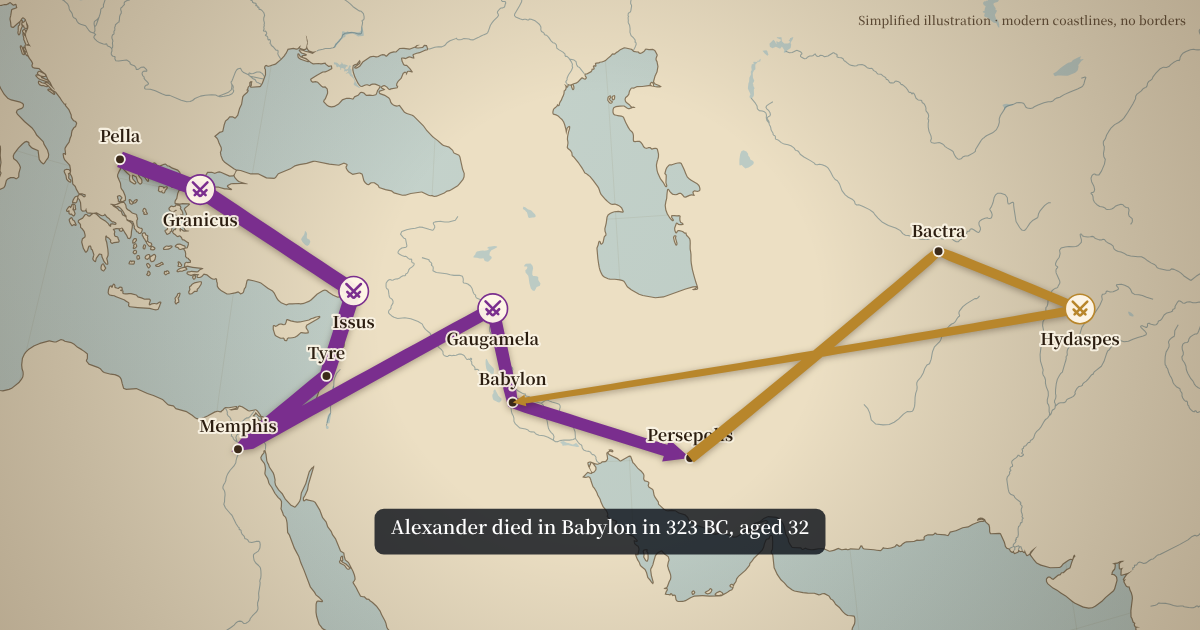
The war map above follows Alexander's campaign against the Persian Empire. The arrow starts at the Granicus (334 BC), passes Issus (333 BC) and the siege of Tyre (332 BC), turns east to Gaugamela (331 BC) and Persepolis (330 BC), and ends at the Hydaspes in today's Pakistan (326 BC). The closing caption notes that Alexander died in Babylon in 323 BC, aged 32.
The route is simplified to the stops a video would name. Swap any city or date to tell a different part of the story, or delete the arrow and start your own.
How to make a war map in five steps
- Add the places. Search each city the army passed through. Untick “Label” on in-between points that only bend the line.
- Set the widths. Use the start and end width sliders to show an army growing or shrinking.
- Mark the battles. Tick “Battle marker” and write a date caption for each fight your narration names.
- Add the other side. “Add arrow” starts a new arrow from the last point, in a new colour. Rename it, e.g. “Retreat” or “Army Group South”.
- Time and export. Load your voice-over, press Space at the start of each sentence, then export an MP4.
Ready-made war map examples
Alexander the Great, 334–323 BC
Granicus, Issus, Tyre, Gaugamela, Persepolis and the Hydaspes. It plays above.
Napoleon in Russia, 1812
The advance to Moscow and the shrinking retreat, with Borodino and the Berezina.
Operation Barbarossa, 1941
Army Groups North, Centre and South, with key dates.
Each example lists its dates on screen. Check them against your own sources before publishing: history channels are judged on accuracy.
Showing strength and losses on a war map
Arrow width is the oldest trick in military cartography. A thick arrow that ends thin tells viewers that the army lost men along the way, without a single number on screen. Set the start width to match the army's size at the outset and the end width to what was left. For a fair comparison between two sides, keep the same scale for both arrows: if 10 units of width stand for 100,000 men on one arrow, use the same on the other.
Colour does the rest. Pick one colour per side and keep it for the whole video, so a viewer who joins halfway still knows who is who.
Borders on a historical war map
Today's borders on a map of 1812 or 330 BC look wrong, so the historical examples hide modern borders and keep only coastlines, rivers and lakes. Rivers matter in most campaigns, from the Granicus to the Berezina, so they stay on by default. Turn borders back on in the Style tab if your story is set in the present, and use the corner note to tell viewers what the map shows.
Tips for a clear war map
- One arrow per idea. Split a long campaign into an advance and a retreat instead of one arrow that doubles back.
- Name fewer places than you know. Label the cities your narration says out loud; untick the label on the rest.
- Let the caption carry the date. Viewers read the caption while the arrow moves, so keep it short: date, then event.
- Hold the last frame. Leave a second or two at the end so the full campaign can be read before you cut away.
Who uses a war map maker
- History channels that explain a campaign in ten minutes and need a map every time the narration moves to a new place.
- Teachers who want students to see how far an army marched, not just read the distance.
- Strategy game and tabletop players who recreate real campaigns and want a clean recap video.
- Writers and podcasters who publish a short video version of an episode.
What they share is a need for many map shots, each simple and accurate, in a consistent style. That is the job this war map maker is built for, rather than a single cinematic sequence.
The map behind the war map maker
Coastlines, rivers, lakes and cities come from Natural Earth, a public-domain dataset. Rivers are drawn by default in the historical examples because so many campaigns turn on a river crossing. The city search covers about 7,300 cities and towns; for an ancient site that is not in the list, pick the nearest modern city and type the historical name in the date caption.
All videos are rendered on your computer. Nothing you type is uploaded, and you own the result.
War map maker FAQ
Can I export a still image of the war map?
Not as a separate option. Export the video and take a still of the last frame in your editor, where the whole campaign is visible.
Can I draw historical borders?
Not yet. Historical boundary data needs a licence check per source; for now the vintage style shows coastlines and rivers without modern borders.
Can I make the arrow curve?
Arrows follow the places you add, so add a few in-between points to bend the line and untick their labels.
How do I time arrows to my narration?
Every place you mark with a label, date or battle is its own part of the timeline. Load your voice-over and press Space at the start of each sentence: the arrow moves to that sentence’s place. Drag a single cut later if one line moves; the other cuts stay where they are.
How many arrows can one war map have?
As many as you need. Each stop on an arrow gets one and a half to three seconds by default, longer for longer marches, and you can change each one in the segment bar.
Can I change the arrow colours?
Yes. Every arrow has its own colour picker, next to its name.
Can I use it for a game or fantasy war?
The maps are of the real world. Fantasy maps are on the list of ideas, not available today.
Can I use the videos on a monetised channel?
Yes. You own the videos you make, and the map data is in the public domain.